Start with what’s there.
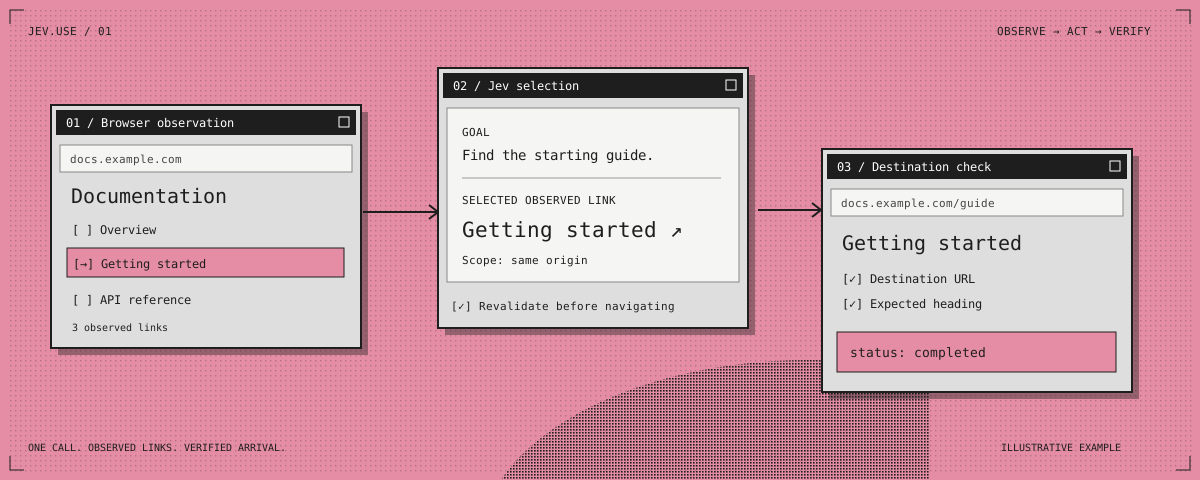
Jev selects from links and controls observed on the current page. The route comes from the live interface.
Meet Jev. Move your cursor. Drag me around.
Use arrow keys to move Jev, Enter to wave, and Escape to send Jev home.
JEV USE / NAVIGATION FOR CODEX
From a goal to the right page. Jev navigates browser tabs and desktop apps, checking the result as it goes.
Your browser. Your session. One navigation call.
A small API.
A clear division of work.
LESS BACK AND FORTH
A whole browser journey runs in one call, without a host-model turn between every hop.
Jev selects from links and controls observed on the current page. The route comes from the live interface.
Define the goal, scope, and hop limit once. Jev follows eligible links and revalidates them before navigating.
Check the destination URL, heading, or your own postcondition. If the journey stops, get a classified reason and fallback.
ONE FACTORY. TWO METHODS.
Use your existing Codex browser provider.
Initialize Jev
once, then reuse the session.
const jev = await createJevBrowser({ browser });

const result = await jev.navigate({
  tab,
  startUrl: 'https://docs.example.com',
  targetUrl: 'https://docs.example.com/guide',
  targetHeading: 'Getting started',
  goal: 'Find the getting-started guide.',
  sameOrigin: true,
  maxHops: 12
});BUILT WITH BOUNDARIES
A result you can inspect, even when the next step needs you.
See the navigation contractFROM YOUR MACHINE TO THE WEB
Install the skill. Connect your browser.
Give Jev somewhere
to go.
git clone https://github.com/vlad-terin/jev-use.git
cd jev-use

# Add TYPESAFE_API_KEY to your local .env file
npm test
npm run install:codex -- --env-file .env
Requires Node.js 22+, a compatible Codex browser provider, and a TypeSafe API key ↗.
The installer stores your environment-file path. The key stays in your local file.
A FEW GOOD QUESTIONS
Jev works with a compatible Codex browser provider. Codex provides the browser and computer-use tools; Jev selects observed targets and runs bounded journeys with verification.
The runtime sends authorized observed page text and link metadata to TypeSafe for selection. Use it with pages and data you are authorized to process. Your API key stays in your local environment file.
Yes. jev.navigations() supports 1–12 independent
browser jobs at a time, using distinct tabs. Desktop and
interactive jobs run at concurrency 1 because they share input
focus.
Yes. Jev Use is MIT licensed. Read, modify, and run the code from GitHub. A TypeSafe API key is required for model selection; see TypeSafe for its service terms and pricing.